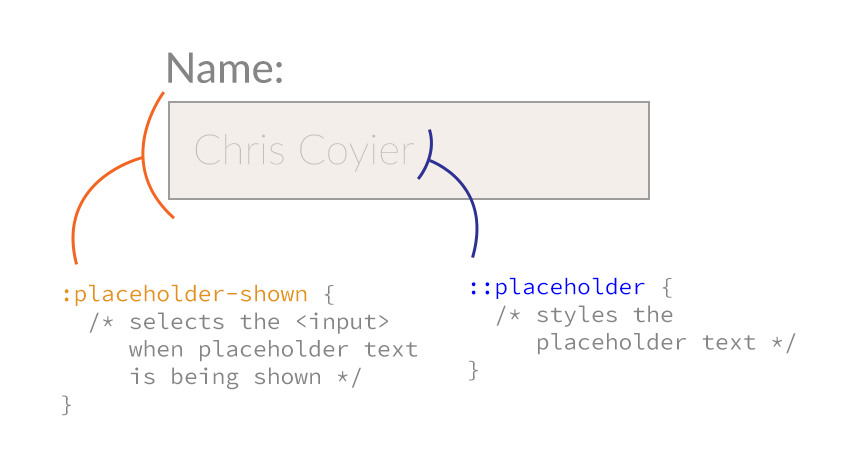
Style Placeholder Text
Placeholder text in inputs has (in the browsers implementing it so far) a light gray color. To style it, you'll need vendor prefix CSS properties.
::-webkit-input-placeholder {
color: red;
}
:-moz-placeholder { /* Firefox 18- */
color: red;
}
::-moz-placeholder { /* Firefox 19+ */
color: red;
}
:-ms-input-placeholder {
color: red;
}
123
456789
Always saving my day. ^^
Awesome Chris — thanks for saving my day again!
nice one..am adding that if you want to add a background-image (eg..search icon )..you can control the space between the place-holder text and that image using the padding of the “father” input tag :)
thanx :)
Thanks. Using Placeholders for the first time. HTML5 rocks!
Hi,
that’s cool, now i can realise placeholder without Java Script.
Thank you.
Why does doing it this way not work??…
::-webkit-input-placeholder, :-moz-placeholder {
color: red;
}
or
::-webkit-input-placeholder, input:-moz-placeholder {
color: red;
}
That would be nice, but the problem is that when a browser doesn’t understand a selector, it invalidates the entire line of selectors (except IE 7).
input:-moz-placeholder{color:#999}
input:-ms-input-placeholder{color:#999}
it works
AnswersLab.com
I had to read this 3 times to get it to click in my head…
“when a browser doesn’t understand a SELECTOR, it invalidates the entire line of selectors”
I keep looking at it and assuming it’ll behave like browser specific RULES since they look like rules.
Chris – It might be worth updating this to address the moz change from pseudo-class to element
Hi,
On my application, when i click on the placeholder text inside the textfield,the cursor does not appear but when I click at the end/outside the text ,the cursor appears .
Enter the username
Double click on the text “Enter the username” works(can type anything inside textfield).
click on the end/outside the text works.(can type anything inside textfield).
But single click on the text and type does not work.(cannot see cursor at all)
What could be the problem here?
Thanks
Not supported in FF5? Can anybody else confirm this?
Nevermind, found the issue. If you have a more specific selector to style your regular input text color, then input:-moz-placeholder is actually overridden.
Example:
#selector input{
color:red
}
input:-moz-placeholder{
color:green
}
Result: placeholder will be red. Instead you’ll need to do:
#selector input{
color:red;
}
#selector input:-moz-placeholder{
color:green;
}
Maybe that’s obvious, but it tripped me up for a few minutes.
Noticed when testing it myself that both the webkit and mozilla prefixes needed double colons, and worked just fine when using specific input id’s.
Just to share a useful tip which rely on this rule. On iOS, the placeholder doesn’t disapear on focus. So you can use “:focus::-webkit-input-placeholder{color:transparent;}” and it works very well. :)
Thanks for this! It’s great to know that you can chain :focus::-webkit-input-placeholder like this =D It appears that all of my browsers (safari, chrome, firefox) don’t make the placeholder disappear when the input field gets focus by default.
What to do on Mozilla? It works fine on Chrome.
You might want to add the following for IE 10 support:
:-ms-input-placeholder {
color: red;
}
Don’t work for me. I had to use !important for them…
By the way, why the placeholder for webkit don’t fade away when we click on the field as it does in Firefox? Do we need to use js?
Really sorry about my last comment, I didn’t read the helpful tip from Jeremy Benaim…
Hi,
I am getting extra left space other than padding in placeholder.
Regards,
Sonam
Hi,
I am getting extra left space other than padding in placeholder.
but it is happening only in iphone browser
Regards,
Sonam
Try to use text-indent instead margin
Thanks for the tip – “That would be nice, but the problem is that when a browser doesn’t understand a selector, it invalidates the entire line of selectors (except IE 7).”
Hi, how can I style placeholder position on iphone? Text-align, vertical-align, margin, padding doesn’t work.
less height, more padding and placeholder is vertical aligned.
Is there any way to change the font-size correctly?
When I set font-size to 14px the text is cut in half and padding-bottom doesn’t help.
Any ideas?
try line-height instead of padding..
It’s figuring out the little things like this that can suck the momentum out of a project!
Thanks for the quick fix Chris!
Is it possible to change the last letter of the placeholder text? I would like to show an asterisk in a different color for required inputfielfds
have a look into using the CSS :after Selector
Hi,
this works fine for me but my problem is I want to change the watermark color in IE…can any one suggest me to change the color of watermark in IE
Please only give advice which you tested. Because this is foolish.
I think that you should take a better look at the pseudo element. It doesn’t work inside the placeholder.
If you can get a placeholder text that says “Name” in purple and then
add a exclamation mark in green behind it using psuedo elements.. then proof it.
FYI, so it says “Name!” in TWO colors, as a placeholder.
Seems to work in some browsers: http://cssdesk.com/uumhS Verified working in Chrome & Safari, not working in Firefox. Haven’t checked on a PC.
Jezus! Why does it work now. Did I make a typo?? Well Zoe I love you. Thanks for the visuals.
Does anybody know how to get this working on Firefox?
why there is two ” :: ” in webkit but in other engins one ” : ” ??
It was decided by the W3C that as of 3.0 pseudo-elements should use the double colon instead of a single one. This is so they can be clearly distinguished from pseudo-classes.
so why do mozilla firfox and microsoft IE use one ” : ” ??????
I wondered that too!
Firefox are switching to :: in version 19: https://bugzilla.mozilla.org/show_bug.cgi?id=737786
no body????
“Sometimes you will see double colons (::) instead of just one (:). This is part of CSS3 and an attempt to distinguish between pseudo-classes and pseudo-elements. Most browsers support both values.”
Source:(https://developer.mozilla.org/en-US/docs/CSS/Pseudo-elements#All_pseudo-elements)
Thanks for this trick :)
great this is very helpfull for me
Just for the record… if anyone requires different coloured placeholders on different elements you can narrow down your selection like this: #first-element ::-webkit-input-placeholder {color: black;} #second-element::-webkit-input-placeholder {color: red;}
Awesome! works fine :) Thank you for sharing.
Hi,
I wonder if there is a code that would hide the text in the search box, place holder, by using CSS. (I was able to change the color, thanks!)
I’m using the plugin Predictive Search for WP. As I can’t find the location of the file where the search form is. (I could change the text there, or delete it there I believe), so I thought I would use CSS to hide it instead if possible.
The search box default text says “Search for products” which I don’t like. I would rather have it to say “Search this site”, or just keep it empty. I tested around with some of the codes you have presented without success.
Hi, this is what I use:
/*
* Placeholders consistency
* */
input::-webkit-input-placeholder, textarea::-webkit-input-placeholder {
color: grey;
}
input:-moz-placeholder, textarea:-moz-placeholder {
color: grey;
}
input:-ms-input-placeholder, textarea:-ms-input-placeholder {
color: grey;
}
Firefox 19 lowers the opacity of the placeholder to 0.54 by default.
To get the correct color you need to reset it:
::-moz-placeholder { opacity: 1; color: red; }THANK YOU!
This was driving me nuts. It hadn’t occurred to me that it was the opacity.
Thank you so much for the opacity point, this has been driving me nuts!
Finally the answer!!! :-) Thanks a lot!!!
why don’t you use a jQuery plugin?
i had some trouble and this code just worked pretty fine for me:
http://jsfiddle.net/gVScP/2/
you just need to do this:
if you use it on a form, the form will have a submit event to clear the placeholder text.
on this case,it will just show the value of every field, after submission.
if you set it on a field, it will behave closely to the default placeholder.
on one hand, this is that it needs jQuery and javascript!
on the other hand, ie users won’t see a empty field, and it will remain the styles.
on your css, just put the class .hasPlaceholder and you are good to go!
I was looking for some compatiblity stats for placeholder styling with CSS on mobile and it seems nothing to me on the internet. So I made some tests with default Android and iOS browsers and here what we got. Most of the latest OS versions default browsers doesn’t support
text-alignas well aspaddingand some other propeties forplaceholder.Is it at all possible to style the placeholder so that it doesn’t disappear when someone starts typing? I’m thinking something along the lines of:
[ Name]
Then the user inputs:
[BRIAN Name]
… so that the placeholder, “Name” stays visible?
I have a same issue as Brian, and strangely cannot find an answer. We want to show the username field prefilled as “@ourcompany.com”, and to remain as they type (though it should only pass the username).
thanks team.. its nice, i really like it
thank you…..yes,….its work fine…..but i want to set dark black color….
when i put #000000…its set light black….:) any idea…?
Here’s a short mixing for styling your placeholder text.
Simply insert it in inside the INPUT selector.
@mixin placeholder($color){
&::-webkit-input-placeholder {
color: $color;
}
&:-moz-placeholder { /* Firefox 18- /
color: $color;
}
&::-moz-placeholder { / Firefox 19+ */
color: $color;
}
&:-ms-input-placeholder {
color: $color;
}
}
input{
background-color: $cyan;
color:white;
@include placeholder(white);
}
I would love it if you could let me know if this was helpful! Twit @NirBenita
Mixin*
Has anyone discovered a work-around for making Mozilla act like Webkit on the chained pseudo-selectors? I would really like to use :focus to change the color of the text on click. Do I need JS to make this happen?
Oops, my bad. Once I updated FF, it started working.
This is working on computer browsers, but not on mobile devices where i am developing a phonegap mobile application. Any idea ?
if you use
[placeholder]::-moz-placeholderetc, it’d clean up Firebug.I have my CSS set up to make button tags the same exact height as my input tags, in addition to aligning them perfectly.
But, when I style
::-webkit-input-placeholderto use a font size that is smaller than the font for my input fields, the height of the input field remains consistent, but the fields are 1 pixel lower than the button, throwing the alignment off for some reason. On Firefox, lowering the font-size for the placeholder doesn’t affect the alignment.Any idea why changing the font-size for placeholder text in webkit browsers alters the field alignment?