
I originally wrote this over two years ago. It was getting a little long in the tooth, especially now that HTML5 has come along and made HTML far more beautiful than even XHTML 1.1 was. So I updated it!
I can’t help but view source on every nice looking website I see. It’s like if you had x-ray glasses that allowed you to see any person you ever saw in their underwear at will. How could you not? It’s just so tempting to see if a beautiful website is built with beautiful code as well, or if its beauty if only skin-deep. Code? Beautiful? Sure. After all, Code is Poetry. This is just HTML, so it can’t be quite as intricate and elegant as a dynamic language, but it still bears the brush strokes of its creator.
It gets me to thinking, what makes beautiful code? In HTML, it comes down to craftsmanship. Let’s take a look at some markup written they way markup should be written and see how beautiful it can be.

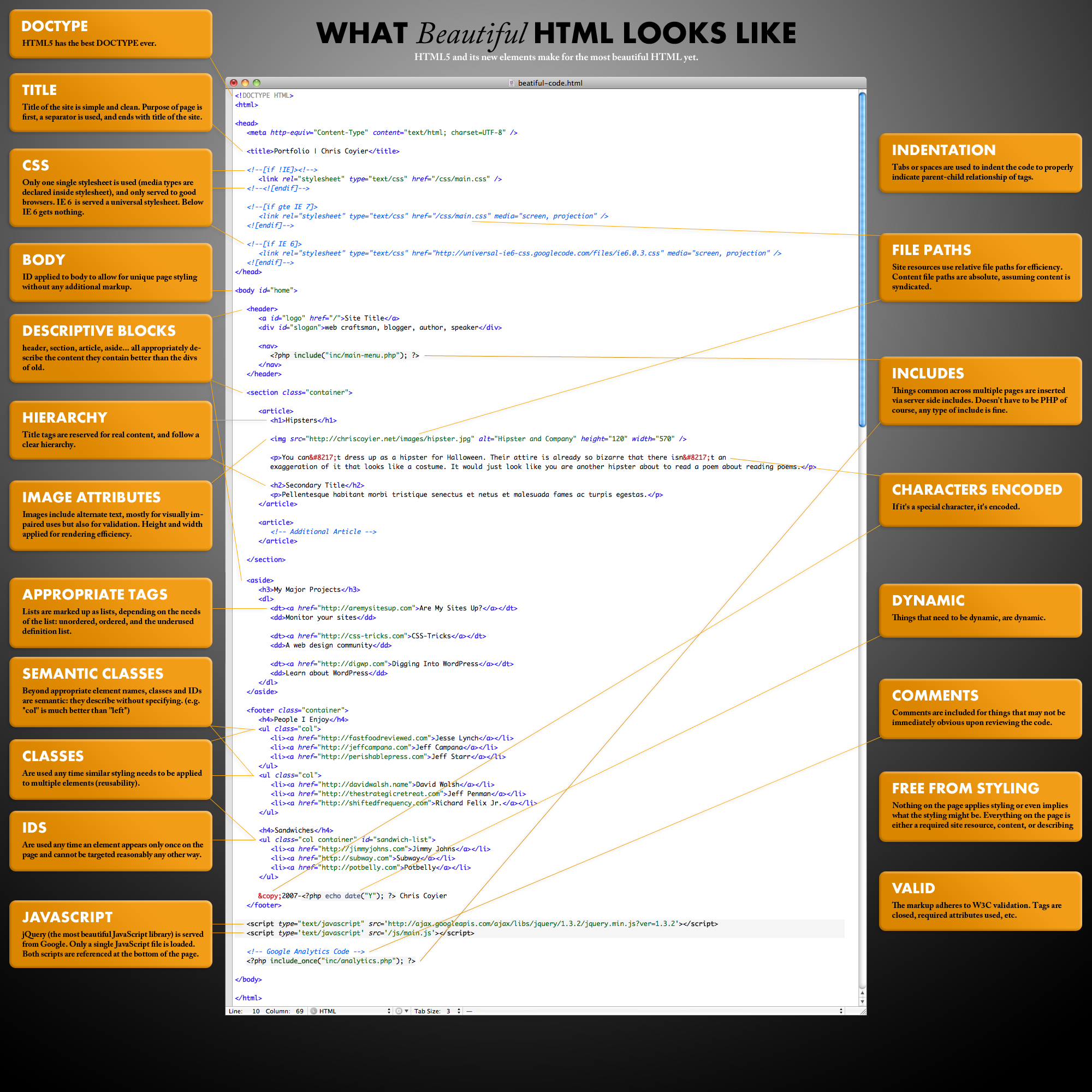
It’s big enough to print out and tape up inside your locker to impress your friends. Well, it might be a bit of an awkward size. I’ll make the PSD available in case you want to alter it.
- HTML5 – HTML5 and it’s new elements make for the most beautiful HTML yet.
- DOCTYPE – HTML5 has the best DOCTYPE ever
- Indentation – Code is indented to show parent/child relationships and emphasize hierarchy.
- Charset – Declared as first thing in the head, before any content.
- Title – Title of the site is simple and clean. Purpose of page is first, a separator is used, and ends with title of the site.
- CSS – Only one single stylesheet is used (media types declared inside stylesheet), and only served to good browsers. IE 6 and below are served a universal stylesheet.
- Body – ID applied to body to allow for unique page styling without any additional markup.
- JavaScript – jQuery (the most beautiful JavaScript library) is served from Google. Only a single JavaScript file is loaded. Both scripts are referenced at the bottom of the page.
- File Paths – Site resources use relative file paths for efficiency. Content file paths are absolute, assuming content is syndicated.
- Image Attributes – Images include alternate text, mostly for visually impaired uses but also for validation. Height and width applied for rendering efficiency.
- Main Content First – The main content of the page comes after basic identity and navigation but before any ancillary content like sidebar material.
- Appropriate Descriptive Block-Level Elements – Header, Nav, Section, Article, Aside… all appropriately describe the content they contain better than the divs of old.
- Hierarchy – Title tags are reserved for real content, and follow a clear hierarchy.
- Appropriate Descriptive Tags – Lists are marked up as lists, depending on the needs of the list: unordered, ordered, and the underused definition list.
- Common Content Included – Things common across multiple pages are inserted via server-side includes (via whatever method, language, or CMS that works for you)
- Semantic Classes – Beyond appropriate element names, classes and IDs are semantic: they describe without specifying. (e.g. “col” is much better than “left”)
- Classes – Are used any time similar styling needs to be applied to multiple elements.
- IDs – Are used any time an element appears only once on the page and cannot be targeted reasonably any other way.
- Dynamic Elements – Things that need to be dynamic are dynamic.
- Characters Encoded – If it’s a special character, it’s encoded.
- Free From Styling – Nothing on the page applies styling or even implies what the styling might be. Everything on the page is either a required site resource, content, or describing content.
- Comments – Comments are included for things that may not be immediately obvious upon reviewing the code.
- Valid – The code should adhere to W3C guidelines. Tags are closed, required attributes used, nothing deprecated, etc.
Very good article. I like the idea of putting an id on the body, have not thought of that before.
I have a website im creating at the moment which has a different footer, so that could have been handy :D
Nice work Chris. Here’s another useful link for your readers . . . http://www.456bereastreet.com/archive/200711/posh_plain_old_semantic_html/
I love clean code no matter which language I use – the only problem is when you have a looming deadline and you catch yourself farting around with beautifying your code rather than completing that important requirement !!!
Do you really need to do this? does it make a blind bit of difference from an seo perspective?
‘Important Content First’
“It is best if your most important content, like news and events, can be listed first in the HTML. If your sidebar is just navigation or less important content, it is best if it comes last in the HTML.”
I’m not sure if it makes a difference for seo (and personally, I think seo is just another trendy bandwagon people hop on for whatever reason — write good, valid code and good content and the rest follows), but…
It makes a WORLD of difference for accessibility.
Ever try to access a website, sight unseen, using a screenreader? Do you really need to plow through a 50-member list of a blogroll before you get to the actual article?
Important content first is also just common sense. I mean, why would you not do that? Is there any valid reason, any AT ALL, for NOT doing it that way?
I second that, David. “SEO” should be “BO” (Browser Optimization). Very few souls know what a Search Engine Is looking for anyway. Like you said “write good, valid code and good content and the rest follows”.. A good Design company should optimize every web page that they upload. Use simple tags like title, description and ALT and everything will be fine.
The HTML 5.1 spec now has the element ‘main‘ to solve this problem of differentiating the main content of your page from header, footer, nav panel, and so on.
Happy to say that I’m using every tip listed on the site I’m currently working on. I always try to structure projects so that I have the time and resources to write clean, semantic code. Failing that, if a client simply is flexible on the schedule I’m almost always willing to invest my own time in perfecting the code. At the end of the day, you want to be proud of your work and know that you did your best. After all, who knows who’s peaking under the covers and writing a blog post about your site. That reminds me (:shudder:), I really need to update my own websites. Cobblers kids syndrome. ;)
All good (and it should be obvious), but the idea of “Code is Tabbed into Sections” is just nonsense.
The page code is for the machines not humans. It shouldn’t matter if it’s tabbed, messy or even all in one line. Actually for IE6 is sometimes better to keep lists in one line, without line breaks.
Perhaps tabbing is good if you write all code per page by hand, but if you use CMS then most likely you’ll not achieve all pretty formatting.
And there are always tools to hand to quickly format page source code to see “how they’ve done it” even if the original HTML is “messy”.
I think it’s extremely important to keep your code tidy, not just for yourself but anyone else in the future that may have to work on the site.
I’ve been handed sites where the time is nearly doubled simply due to the fact that somebody clearly didn’t care for any type of order.
Even if you do use a CMS, it will most likely be using templates that you will at some point want to make an edit too.
Surely you must be joking. Your code formatting is critical to maintaining easily managable files. Even with a CMS you often have to make changes on the template level, and you’re digging all around messy code, looking for that list item in a sea of chaos, you’re going to wish you were more organized.
The quality of your code formatting is a clear indication of the diligence and thoroughness of the coder. Plain and simple.
The issue here is just “when.” Tabbing is for humans. Browsers just want tight, valid code.
So, you’re both right.
Ever heard of code tidy tools u noob?
No inline styling? I don’t want to create CSS for every wild idea I might have during a temporary holiday rebrand, such as an ugly green DIV inside content area with a background image. So I’m supposed to put all that into it’s own css file for ONE page? I think not.
But as a general rule, I agree with you. That said, I think most people reading this site already know that. Don’t they?
You use the id attribute on body tag as shown in the post, and the reference that div accordingly.
@smickworks: I’d said by creating separate stylesheet for just one page you loose the benefit of having CSS in cache, but still — content should be separated from presentation, no matter if it only does appear on a single page or is common.
You can put all pages css in one file. It’s just a very long css file (depending on the site).
Do this new decriptive blocks support non HTML5 browsers?
Nice writing ;)
Title should go AFTER the meta tag with the encoding, because if the title contains non-ascii chars, you may be seriously screwed — IE can show an empty page.
Good point!
Doesn’t valid HTML5 require that the charset be first in the head, anyway?
No. It doesn’t have to be the first one. It just has to be within the first x characters or lines or something (I don’t remember exactly). But there’s really no reason not to put it first IMO.
Very useful article, thanks especially for the body id. I’ll use this as a checklist for my future websites.
Hi everyone,
Good article, good comments.
I’ve also been wondering about cleaner code but I bumped into some obstacles I still haven’t found a good solution for.
1: how should we combine PHP HTML and Javascript in one file? If I code PHP, I try to use the MVC model and use only some loops and echo statements in the “view” pages. But if I then also add JS to the mix, it quickly gets chaotic.
2:If you want your PHP to produce clean well indented HTML you have to code in /t and /n by hand in your PHP. That makes your PHP less clean and readable. Because the PHP code is more likely to produce complex problems for which I want the most clean code I prefer to have less clean HTML.
3: A problem I bumped into recently. If you have a site where you let your users add content and you let them use certain tags, how do you control that the tags used are also clean?
What are your thoughts on these questions?
1: We shouldn’t. Use a template system instead, personally I like PHPTAL
1: Why one file? Different application tiers have different MVC uses, you can have views on a database tier, but those views form the model for the tier above. Same goes for the client tier, the server serves its view (the HTML) and that is the browser page’s model. Presentation should be governed by CSS if applying MVC.
2: You can use the heredoc syntax in PHP, and your PHP will be a lot cleaner and very readable.
3: That’s application logic, you can always try to format and validate it, should be fun.
No PHP includes, jsp:includes, or any of that other rot. If you decide you don’t want to include the content at that particular location, or at all, then guess what – you get to change all 150 pages of your site.
No, instead, use a decorator/compositor, like sitemesh, or a mvc framework like RoR that provides view templating for free.
Don’t include headers and footers into your page – include your page into your headers and footers!
Like you, I view source of sites I visit, just to see if competitors do clean code as clean as I can do.
To clarify about IE and xhtml. IE defaults to quirks mode with an xhtml 1.1 doctype but does not with xhtml1.0 strict.
Secondly, it’s semantic if it can be read. Having an extra div around a ul isn’t going to kill anyone. Although, I personally wouldn’t do the extra divs though.
Lastly, tabbing the code helps other coders – html isn’t for machines only – someone may need to go in and work with it at a later point whether in a cms our outside, it helps immensely.
I feel for you Chris, I have the same addiction to well crafted code.
I do that allot myself. Especially when I see a pretty site I tend to wonder “How pretty is it under the skin?”.
I find it a challenge when doing dynamic sites to generate a HTML document that looks nice with proper indentation structure and linebreaks. It’s come to a point where I just got to face the facts that I spend too much time on it and really just need to leave it alone.
Nice article. Too bad ,however, that the very site the article is on doesn’t validate. H1 element inside an A element, missing alt attribute, unclosed P elements.
Nice list!
I wonder if there is a tool that can check my website and give me hints how to improve it. Or is there even a tool that helps transforming a table based design into a clean div design?
Any hint would be highly appreciated!
@Inwit,
Yes there is such a tool, the human brain and its motivation for standards and clean code ;-)
Seriously: I think it is much better to redesign/refactor code by hand than to let software do it.
I rarely trust machine-generated code.
Case in point: Horrid Dreamweaver and Frontpage sites… *shudders*
I have the same kind of addiction, though I more often do a CTRL+SHIFT+S in firebug.
One could argue that a semantically clean menu doesn’t need a wrapped around it.
Enjoyed the article.
This is a very nice article, a few new tips for me and a few good ideas I sometimes forget. One thing that someone told me to do that I LOVE now is to put a comment at the end of my divs that makes it clear which div it belonged to
Hi,
Good advices, but i’d rather (and I do it) put a class on the body, instead of an ID.
The body tag is already unique, so body.yourclass will be unique, no need for an ID.
Plus, the ID you choose for your body could conflict with an ID used in the entire page.
To conclude, we could also say that in *one* website, the different pages bodies are the same “object”. Giving them an ID would mean “each body is a different entity”, which is not true : same entity but with little (or big) differences, so the class is semanticaly better, to my opinion.
My 2 cents…
In this case, using an id on the body element makes sense. It’s used to indicate the specific page being loaded. this can be useful if you need to override the default CSS for a single page, now you have an id you can use in your selector statement.
I disagree.
A body only appears once, so there’s no reason you can’t use an ID instead of a class.
As far as why you should use an ID instead of a class is stated in the article/image. It’s for applying particular unique styling to a particular unique page.
Now, if one were to have a subset of multiple pages styled this way, a class would be appropriate.
Say, for example, you want a certain different look for your online catalog versus your blog. All the pages for the catalog could have a body class of “catalog” and get a green background.
But then, you have a page in the catalog of sale items, give that body an id of “red_hot” and style the background red, since it’s unique.
Some of this is unnecessary when using a CMS, but if you want to avoid loading extra stylesheets, or you want to give special treatment via JavaScript, an id and/or class on the body can provide a very useful hook into your markup.
There’s only one body-element in the document and inside the html-element, so you can identify it with an ID. It doesn’t matter, how many documents exist in your website.
@John Lascurettes:
While you’re technically right, in regards to not needing a wrapping div, it’s still good to do for several reasons.
Just one example: planning for the future. The beauty of CSS is that you can markup a document semantically, and the presentation layer is kept separate. in an ideal world, that means you can markup a page once, and design and re-design to your heart’s content. You might not need a wrapping div NOW, but it doesn’t hurt, it adds more control, and you might change your mind.
Hey, i love the article.. I was wondering if you could show me a HTML of a text box. I need it for somthing, but of course i don’t know what it looks like.. Thanks!
-Ashley
“Keeping your code clean and beautiful can actually save you time in the long run, because it is so much easier to read and find things.
That’s SO TRUE! I’m just learning my way around web design, but I learned that one mighty fast. Plus I was able to have a really good laugh over some of the gobbledegook I found when I cleaned out my templates. :):)
While the HTML code is clean, it isn’t anything special. If you’re design a typical site like this one with the typical header, menu bar, search box, sidebars, content area, and footer. It could work. But when you design a business site with many panels of contents, I doubt your clean HTML code would work.
1st Rule all programmers should follow is COMMENTING!!!
1) You’ve presented zero reasons why this kind of markup would not work. It would simply have more elements, and probably more dynamic content.
2) Commenting is mentioned and highlighted in both the image and the article.
To be honest, html comments are much less important that code comments. And by code, I mean real code (PHP, JavaScript, etc), not markup (HTML).
The only reason to use an HTML comment (as illustrated in the article) is if it’s not completely self evident what the code is doing. Like the php includes.
Example: You can see the site, and see the markup… any real reason you need a comment that says “this is the main navigation menu” for a UL element with the class of “main_nav_menu”?
You clearly have not done any big project so you don’t know. Go to bbc.co.uk, nytimes.com, msn.com or any other large and well known website and then tell me bout beatuful semantic markup
re ‘wow’: Allow me to introduce you to the ought/is fallacy. What is ain’t necessarily what ought be. And the reverse. Stop trolling.
Commenting…is that the bracket-exclamation point-thingie I do to leave notes for myself so I know where the heck I am in the midst of all my gobbledegook??
I live by those.
@sV : Commenting HTML? ROFL! If you want to loose precious bandwitdth and slow down your clients, yep, definitely the way to go!
Comments are OK for server side scripting or source code to be compiled while it’s BAD to put it in your HTML or CSS code.
If you want to share informations, make a *documentation*, not comments.
And it is possible to keep a huge website clean. In fact you must do it if you don’t want it to collapse after 6 months of patching.
“Clean” doesn’t meaning “basic”, you can produce clean complex code.
Btw, you don’t need to comment if it’s clean ;-)
I really don’t think I can agree with you more!
Also, “writing HTML/CSS” != “programming”
It’s just markup.
If you’re smart with your namespace and use descriptive id’s and class names, there’s rarely a need for HTML comments, IMHO.
That is a beautiful image of what beautiful HTML code looks like!
Thanks.
Good example how to code in HTML. Thanks. I only add that title tag are very important and I agree with Chris Coyier that title tag should go after meta tags.
The body id can be done automatically with php:
<body id="<?= basename($_SERVER['PHP_SELF'], ".php")?>">Particularly useful if you’re using a template.
I don’t agree with all of these. A lot of these features are used to force your HTML/CSS to over-reach itself (e.g. wrapping up a page in a DIV serves no semantic purpose at all – it just helps designers achieve graphical/typographical effects). Similarly, the point of putting a menu in a list is that it is just that – a list; not so you can add rounded corners to your tabs.
Also, isn’t it a better idea to keep your headers logically organised and styled consistently? Why change your level 2 headings from page to page – it just confuses the user.
Beautiful code should be well structured and marked up semantically. That is what makes it easy to read.
“Why change your level 2 headings from page to page – it just confuses the user.”
The reason is that level 2 headers may all mean the same thing across your site, but that doesn’t dictate that they should all look the same.
How exactly does changing the H2 tag from page to page confuse the user? That don’t see the tags, so who cares if it’s H2, H4 or .sometext? And if the only way to create a desired site presentation is to wrap it in a DIV, what’s it hurt?
Heading levels are announced by screen readers, they can navigate by them too. So if you’re listening to a page, it starts by reading all the guff in the header, you can just press the key for H1 or H2 to skip the jibber-jabber and start hearing the content actually relevant to the page. Consistent use of heading levels across your site will be a godsend to a blind user.
You do have some nice clean html and some great recommendations. I would argue that you left out one more thing. The html should also be minimized.
I actually would disagree with nearly everything in this article. It misses the point entirely. The point of HTML css and other related technologies is to produce the website and then usually keep the website up to date. The point of HTML css and so on is not the end in itself. People don’t pay you to write code they pay you to solve a problem. Thus they want the problem solved without generating new problems. So creating the cleanest simplest code possible that does exactly the work required is what most people want. So in reading the above article I would ask the scientific questions of why and prove it for each of the points.
# DOCTYPE Properly Declared
Why? Most web pages will be totally fine without this thus it adds unneeded clutter. Plus the w3 people are really ticked withevery pointing to their site. They say if you have to use this then put the .dtd file on your own server and use your own damn bandwidth.
# Tidy Head Section
I agree. Keep things tidy like this says.
# Body IDed
Why? What does this accomplish as compared to not using it. Personally I can think of specific reasons to id the body such as if you are going to dynamically alter it. But otherwise you end up with code that might do nothing.
# Semantically Clean Menu
Why? If the menu is likely to change then this might be a good rule. But depending on the menu structure and page design this might not be a good idea.
# Main DIV for all Page Content
Why. This might be code for the sake of coding. What problem does this solve?
# Important Content First
Why? SEO maybe? Western people read left to right and top to bottom. Thus in a somewhat standard 3 column layout I would expect Header, left, center, right, footer to be the code order anything else and I am hunting around.
# Common Content INCLUDED
This I somewhat agree with. Generally a good idea but sometimes this will work and others it won’t. It is an architecture issue.
# Code is Tabbed into Sections
Oh I love properly tabbed code. Tabs are my friend. On an offt opic note Python uses tabs as its method of structure. Thus code tabbed in will be the same as braced code in most other languages that use braces.
# Proper Ending Tags
Yes but I really hate people who put that little /> at the image tag among others. It works fine without it and no major browser has the slightest problem without it.
# Hierarchy of Header Tags
SEO has its own set of rules that are ruining header tags for everyone. But once again clients are not paying for nice code they are running a business and SEO is generally very important to their bottom line thus it superceeds all good design rules.
# Content, Content, Content
P vs BR is more of a style choice. If you plan on noodling P in your CSS then it can be better but if you don’t then why not stick with a tag more inline with how computers think?
# No Styling!
Wrong wrong wrong. CSS is a tool like all the others. Tables font and other tags are just tools. A table can go a million miles with few surprises that CSS will kill you with. But again it is an architecture issue. If you have hundreds of hand coded html pages then CSS will save you during your next site redesign but if you only have a few templates in a database driven site then putting too much of your formatting in css will just get in your way and increase code complexity.
My rule is to use the right tool for the job not my favorite tool for the job. The right tool should result in the fewest number of small simple files. A good example of where I have seen bad use of things like CSS is where you have say 30 fundamentally different pages in a site and all their css is clumped into one file. Just as bad would be to have the css broken up in 30 separate files.
CSS in a separate file serves three purposes. A common repository for common code, potentially a single place to reformat the entire site and to speed the loading of the site as the the css file will be 304’d. So if the css is not repeated throughout the site then that only leaves speeding up page load times. So if you are facing a common situation of copying some CSS into a CSS file that is used in only one place on a page infrequently loaded why is it in the css file? Why not go so far as to put the CSS into a style attribute right where it gets used? Css purists will get all wound up over this one but to me this reeks of religion not fact. In good programming you want to keep in mind that real people will read this code. If a person is in making changes to a page and they have to jump back and fourth to a css file and hunt for some tags modifiers then have you served the purposes of your client or have you served the purposes of some rules that someone made up in their head? If the style modifiers are right where you need to make your changes then you have made everything easier, simpler, and thus cheaper.
Personally I would fire any programmers that I found wasting my money on “proper” formatting that only served to complicate and obfuscate the code and thus miss the whole point as to why they were hired in the first place; Solving problems.
Much more important code rules that I impose are like: Use English in code. ftr_l.png is bad where footer_left.png is better.
First, I completely disagree with nearly every single thing you just said.
# DOCTYPE Properly Declared
A) Doctypes exist for a reason. If you don’t understand, perhaps you should google.
# Body IDed
A) Explained in an above comment of mine. It’s for control over, and hooks into, your markup.
# Semantically Clean Menu
A) Everything should be semantically clean. This isn’t just about your “made for IE 6” site looking alright or your Frontpage/Dreamweaver code working… it’s about longevity, stability, and compatibility of markup.
# Main DIV for all Page Content
A) This is, currently, the only way to solve certain design problems like fixed-width, centered websites.
# Important Content First
A) Again, previous comment. Accessibility. Screenreader users shouldn’t have to listen to your whole blogroll or list of probably unrelated corporate services just to get to an article.
And, why NOT put the important content first? I’ve yet to hear a valid reason why you would purposefully not do this, other than developer laziness.
# Proper Ending Tags
A) An image tag is, by definition, a self closing tag. Like link tag and meta tags. Not sure why you’re arguing with the rules. It’s like saying, yeah, but I hate using if/else code in programming… i’d rather use turtle/shell o_0
# Hierarchy of Header Tags
A) People who blindly read and follow SEO crap are their own worst enemies. Valid, semantic code, and useful, relevant content are the only two things you ever need to worry about. The rest is all diminishing returns, especially if you’re paying some “SEO expert” to muck up your site.
# P vs BR is more of a style choice.
A) No, actually it’s not. It’s a semantic and structural choice. If something is a paragraph, you use the P tag, if you just want to break a line of text, use the br tag. Pretty simple, really.
# putting too much of your formatting in css will just get in your way and increase code complexity
A) No, just plain wrong. Using table for something that’s not tabular data is just ignorant. Using CSS doesn’t complicate things, at all — it greatly simplifies things.
Ever hear of DRY? Reusable code? Modularity? Ease of maintenance?
# put the CSS into a style attribute right where it gets used… reeks of religion not fact
A) That’s potentially the dumbest thing I’ve ever heard a supposedly smart person say.
Second, I lost all hope in have meaningful debate with you on the topic once I saw this:
“wasting my money on “proper” formatting that only served to complicate and obfuscate the code ”
Proper formatting obfuscates the code? Really?
I wouldn’t mind being fired by you for that reason, but it also makes me really, REALLY thankful I don’t work for someone like you.
@Robert You’re kidding, right?! Wow.
I can’t believe you took the time to write that. What a waste of energy. You couldn’t be more wrong.
I think Robert was just joking, right? I mean, everything he said was clearly way, way off.
Then I went and looked at his website. I’m still laughing my arse off. HAHAHA
@Robert:
DOCTYPE: Leaving it out triggers quirks mode with many odd behaviours making it hard to produse cross browser implementations as quick mode in other browsers tried to implement IE’s many quicks. And this makes it all a guessing game.
And where have you heard that W3C don’t want people to use a doctype with DTD relating to the w3c site? There’s no browser that loads the DTD of HTML files, so it got no grounds for that statement.
Semantically Clean Menu:
It’s not just a semantically clean menu that’s important, but the whole document. And the reason being is to make machines understand and interpret the content. Assistive technologies, search engines are the biggest groups which benefit from semantic documents.
Important Content First:
Because a website might be represented in so many ways. A mobile phone, for instance, will not be able to display a three column layout. It will need everything linearised. Websites is being accessed by so much more than just a browser on a computer. That’s why the layout shouldn’t dictate the order of your content.
Proper Ending Tags
The /> is there because it’s in XHTML format. HTML in XML format. If you don’t like that use HTML.
The benefit XHTML has over HTML is that you can use a simple XML parser to read and iterate over the DOM. If you have HTML you need an SMGL parser which is not so simple.
Hierarchy of Header Tags
“SEO has its own set of rules that are ruining header tags for everyone.” –And what would that be?
# Content, Content, Content
P vs BR is NOT a style choice. A P element defines a paragraph, a BR is simply a forced linebreak. How is BR more inline with how computers think?
# No Styling!
Tables for layout and font tags are the wrong tools, period. It’s all about separating the layout from the content.
By the whole it appears that you see websites as a purely visual matter. Your arguments doesn’t accommodate how to present the document to different media, such as screen readers, handheld devices and print. Leaving all the layout into separate CSS files allows you to serve a different CSS to these different medias.
If a site has 30 pages that need 30 different stylesheets then the real question is why does it require 30 different stylesheet? Why is there no consistency?
“Personally I would fire any programmers that I found wasting my money on “proper” formatting that only served to complicate and obfuscate the code and thus miss the whole point as to why they were hired in the first place; Solving problems.”
CSS doesn’t complicate or obfuscate. That would be solely due to the person writing the codes.
Some of your questions are valid if you look at the articles as a spesific example. Several of the DIVs and IDs might not be needed. It’d all depend on each site and the markup should be adapted to each case.
However, many of you questions regarding semantics and separating layout from content doesn’t hold water. Have you read up on the benefits of web semantics? The value of separating content, layout and behaviour?
Thomas, don’t loose your energy with Robert, we obviously don’t live in the same world ;-)
At best it’s a troll, at worst he really believe what he is saying…
He’s precisely the kind of client that every freelancer should fear…
He thinks he’s smart enough to not only do your job, but do your job better.
In short: Dangerous.
“In general, I find that expressing your page with the fewest (and no fewer) elements possible to be most preferred.”
Yes – with a caveat. Sometimes it’s useful to add an extra div in places where it might be useful as a styling hook at a later date. A couple of times I’ve cursed myself for not putting any spare styling hooks in when I’ve wanted to tweak something, and have had to either not bother, or go through every page adding them. A few spare divs round key chunks of the page won’t hurt, and could save you a lot of time in the long run.
“No, no, no. Why would you even bother to set the character set, then, if you’re not going to use the characters in it? Just put the © symbol directly in your code, a practice that has it show up properly as long as you’ve set the proper charset.”
No, no, no. Do you know what charset your text editor is using? I don’t – it could be Windows-1252 for all I know. Typing UTF-8 into the third line of a plain text document doesn’t magically save that document in UTF-8! I’d rather stay safe and use the character encoding, and guarantee that it will come out right in every browser.
If you are not able to save your files utf-8 then you shouldn’t be web devoloping (or learn harder).
If you know what your editor does (and your web server) then there’s no point in writing encoded entities.
Amen to that. Why should one use these horrible encoding strings instead of saving your files UTF-8 (no BOM) encoded.
Saves you a lot of trouble.
Great article, but can you please tell me how to go about getting the ‘important content’ first. I use php includes to manage my navigation and footer, and when seen in the html source, the navigation part is first, how do I get the ‘content’ read first?
Thanks
You’d want to include the content before, say, your sidebar, using a typical blog as an example.
The main reason is Accessibility.
A person with a screenreader (which reads linearly down the page) should not have to skip through your 50-item list of categories and blogroll just to get to your article.
Hey, if you use Haml for all your HTML needs, you’re already half way there!
Very nice article, however I might suggest another tip to your list: use the right graphic file format for the right image type.
Your “CleanCode” image should obviously be PNG (or GIF), NOT JPEG. JPEG is for photographic content, and your CleanCode image is clearly not a photo!
I did some tests, and you should be able to make an 8-bit PNG with 32 colors at around 100-125 KiB, with a better end result than your 896 KiB JPEG file. The same could probably be done with the PDF if you embed a PNG instead of a JPEG.
What?! Jpeg is a supported web image!
Thanks for letting all the dummies out Chris, lmao!
Very good article! I also had never thought of using an id on the body :)
Clean code isn’t a hobby, chore or job, it’s a way of life. I can’t stand it when I see a horribly coded website that looks good, it just ruins my admiration for the developer who created it.
By the way, I view sourced your site as well because I am a web developer myself and do exactly the same thing. Your site has some pretty clean code my friend, good job.
If only every would be web developer read this post..
You could simplify your IE CSS a lot more by using conditional comments to render divs with ID of the IE version and a class of IE. This way you can keep all of your styles together in one stylesheet. Makes it a lot easier to manage. Look at the source code of newsweek.com to see what I mean.
I’m assuming you’re using a reset stylesheet in your main.css file. This is fine for a small site, but bigger sites need stylesheets broken out more for flexibility.
With HTML5 you do not need to declare a “type” attribute.
http://diveintohtml5.org/semantics.html#rel-stylesheet
Does HTML5 is now supporting php type tags? :) Anyway, good work :)
Why are JS files declared at the bottom of the page? They should really be in the head.
Thanks,
This is common practice so that loading JS won’t potentially slow down the rendering of the whole site.
As stated to prevent blocking (slow down), that said you can use parallel loading of your JS files, whilst still in the head of your document to achieve the same thing.
I personally use parallel loading, in the bottom of my document, not only ensuring faster loading of content, but faster rendering and zero blocking.
In fact my scripts appends my scripts into the head of the document, which means it still looks correct in things like firebug.
x
The only thing I would be inclined to do differently, is the location of your H1 tag. I normally put it around the site logo or title, if it has one. In this case it would come in the line that says:
That way, if your page is viewed or printed without styles, you will still have a nice big bold H1 site title at the top of your page. The remaining headings can then start with H2, H3, etc. It may not be strictly semantically correct, but isn’t H1 the closest thing we have (apart from TITLE, which does not belong in the body) for semantically describing the site title?
I thought it might also be useful for SEO purposes, but I could be wrong, if the title tag has the same content and takes higher precedence for SEO. Anyone know the answer to this?
I used to be 100% on board with that but now I disagree. I think logos should just be plain old anchor links and <h1>’s should be reserved for whatever the main heading for that page is. Just a personal preference. I want call out the #1 most important thing on the page being the content on that page, not the logo.
I would have to agree with Chris, as content is king and logo is just secondary. H1 tags should definitely be used on content titles not logos….
If anything, I’d put a blog’s tagline in an h1, and leave the name and logo in regular ‘a’ and img tags.
Even then, you’re wasting an h1 tag, so be careful where you choose to allot it.
Your H1 is possibly the most important unique content element from an SEO standpoint. Page Title helps as well, but more from a user viewing SERPs standpoint than a a crawler looking at your content and determining its relevance. Anchor the logo, title it and leave it. “Introduce” your page clearly with the H1 and you’re set.
In my opinion to increase the relevancy of your keywords, your title and main heading should be almost same.
so there will not be the issue that where we should put H1 as title and H1 serve the same purpose i.e. describe the content of the page
Enjoy the example. Small typo in the title bar of the _image_ caught my eye, when everything else is so carefully presented. “beatiful-code” doesn’t matter, but fyi.
Chris,
Just a question about indentation. Do you use tabs or spaces to do it? As far as the final product, as much as I would like to keep my code nicely organized, there is always a piece of content (i.e. CMS or some server-side process) that will mess it up.
Cheers
I don’t think the end-result needs to be perfectly formatted as compared to the templates you’re using.
Machines don’t care how it’s formatted. You, on the other hand, need to be able to read and maintain the code.
I, too, have formatting issues when I include certain things, but my view templates are totally clean, so that’s the perfect solution for me.
You use UTF-8 and encode special characters.. why is that ?
I was about to ask the same. Surely if you are writing your pages in UTF-8 then it makes sense to write the raw character rather than the character code? It makes sense from two points of view: you aren’t inflating the file size with stuff you don’t need; and you can read what you’ve written without having to parse character codes in your head!
If you’re going to write all the character codes out, then there’s really no point in using UTF-8.
I’d love to use the extensible tags like
section</code andasidebut I though that IE6 wouldn't pick them up. Can anyone confirm or deny this?IE6 won’t see them without a JavaScript shiv -> http://ejohn.org/blog/html5-shiv/
IE 6 doesn’t do many things correctly, and it sure doesn’t support HTML5 without some external help from JS.
Awesome! I need to learn HTML5.
The great thing about that is that it isn’t much to learn, HTML5 is quite similar to XHTML 1.0 – 1.1 :)
Hi,
I like your description of beautiful HTML code, but I’d like to point out one addition to HTML5 which makes this even prettier. Defining the charset in HTML5 is possible like this:
An explanation for why this works can be found in this public-html mailinglist message (via Mark Pilgrim).
Yikes, that didn’t work at all—code didn’t show up. Let me try again (and feel free to merge this comment with the previous one):
<meta charset="utf-8">Ah, and secondly, there is no need to escape any character except for < and &. Code looks much better with only the necessary characters encoded.
Thanks for updating this, Chris! It’s replacing the old one on my wall.
Great stuff, Chris.
I have one question that might be my own oversight. I noticed you added a class to the footer tag which implies it should be styled, rather than a div called footer. But without a javascript createElement shiv, IE7 and IE8 don’t recognize the footer tag. Are the conditional IE CSS calls in the head meant to accomodate for that?
I went back and forth on the shiv… I chose not to include it because it’s kind of a temporary thing and this article isn’t really about that…
About the class though, it doesn’t need that class in order to be uniquely styled. Notice that class name is shared with many other elements throughout the page (“container”). That’s the class name I use for the clearfix.
This is nice for pure HTML.
However, when there is web scripting involved (i.e. PHP), there tends to be output that is not properly indented.
You can still fix that by proper indenting within the PHP code. It’s harder, and more time-consuming, but it’s still possible.
:( i wish my html looked like this. it’s getting better, but right now its kind of messy. I don’t have my title first, and my javascript is in the head. I’ll porbably move it to the footer eventually, but ow much of a deal is it? I have document.ready, so how much different does it make? I’m not trying to contentious or anything, I’m genuinely curious.
Hey Chris, one more thought: It’s unprintable! Even on 11×17 tabloid paper, the descriptive text is about 4pt. I hacked your PSD and significantly cropped the code sample window and then pushed the right column to the left one full column-width. Now, on 11×17, the type is legible. Thanks again for making this available! Art
Just wondering why you would “encode special characters” if you are already specifying utf-8? I don’t buy the “hard to tell what your editor is using” argument because… well… it’s not hard to tell what your editor is using.
Being able to copy and paste provided content into code without replacing anything is pretty nice…
For the most part I like your HTML layout. I would say that the head and body elements should be indented inside the html element though to be consistent.
You are probably right, it’s just for some reason over the years I’ve always left those hard-left. Really no idea why but anything else looks funny to me now.
I don’t know if this has been mentioned but if you’re using html5, and you want it to wwork in IE, then you need to include this http://ejohn.org/blog/html5-shiv/ to style the elements
This addresses a question I had:
What problems will I run into with browser support if I start using these tips. I am assuming that the new tags might not be supported in older browsers. I would love to start implementing all of this if I knew what kind of browser support was available. Any one care to enlighten me?
excellent tips article! I was aware of several..but definitely not about all of them! beautiful! thanks!
Script tags belong in the section, not strewn about wildly in the page body. If you want code to run after page load or domready, then use the correct event handlers.
Those script tags aren’t “stewn about wildly,” they’re specifically put at the bottom of the page so they don’t block other parts of the page from downloading, thus decreasing the amount of time it takes for the page to render.
Check out what Yahoo has to say on the matter.
Above comment should say <head> section, apparently HTML is not escaped here…. hrmmm alert(‘Vulnerable to script injection’)
Why are you doing three conditionals for the stylesheet? I usually do a normal include, which IE6 sees as well, and then do a conditional for only IE6 that fixes broken elements.
Good one Chris.
Good one. Just sent this to a friend.
For accessibility shouldn’t tags have a title attribute?
That I’m aware, title attributes are never a requirement, for validation, accessibility, or otherwise.
Alt attributes on img tags, sure. But title tags are purely optional.
Title tags are certainly not a requirement, but they can be extremely useful for accessibility purposes, especially when dealing with links.
Screen readers are capable of skipping from link-to-link. Therefore, if the text of your link does not make sense all by itself, then you need a title tag to help add context to it.
That said, I’ve been told it’s worse to add titles if they are identical to the link text. Therefore, something like:
You can <a href="http://www.example.com/" title="View an article about clean HTML">read the article</a> if you feel like it.is good, but something like:
You can <a href="http://www.example.com/" title="View an article about clean HTML">View an article about clean HTML</a>is bad. Title tags should only be used to add context where it is missing.
See, to me, using classes instead of ID’s (where ID was intended to be a single call), is a sign of sloppy code. I wouldn’t approve of my developers doing the class on the section and footer, when they should be styling the footer directly, and only using an ID to undo the styling in unique scenarios, nested footers inside other elements, or using advanced CSS selectors to get around it.
Maybe I’ve been ruined by seeing horrible front end templating code (cough, zen cart, os commerce, cube cart, most cms templates), but classes overall are a last resort for me, and my department.
In the second paragraph you should’ve said (the) instead of (they).
This article is outstanding. I’m only sad that I didn’t run across it earlier in my coding career. I’m actually stunned that anyone could have the nerve to challenge this. Have you ever updated a “dirty” site authored by someone else??? Apparently not..
i dont know. i thing, the footer element is not valid when using the headings (like h4)
Using h4 headings is completely valid, this case included.
Code is art:
http://camendesign.com
P.S. your form requires JS. Please refer to http://camendesign.com/website_optimisation_measures
Cool, I love the code formatting, it looks really great!
But.. this is very useless and a waste of our bandwidth. HTML == output, not art. If you stop indenting, your page will be less smaller in filesize and load faster. LOL I really think there are some people who believe search-engines would rank a site higher if it is perfectly indented. Minified and compressed HTML is much more valuable: less data, loads faster. So if your site has a lots of visitors, it has to be delivered Minified/compressed.
Also, you are using UTF-8, so you don’t need to use HTML-entities, isnt it?
I also think it is very evil to put the script-tags at the end of the body; it should be loaded inside the head-tags. I see you are using jQuery, so you just should use the ready event.
I usually include scripts inside head, why end of the body?
<aside><h3>…</h3></aside>is far from beautiful if you read the HTML5 spec. Inside sectioning elements, reset your headers and start anew using h1.By the way, this site’s comment escaper fails:
Why do you ask for unescaped code when you really mean escaped code?
You can paste in unescaped code (the kind you can read easily), and it gets escaped by the browser if it’s in a ‘code’ tag.
To everyone nagging about the JavaScript not being referenced in the head: http://developer.yahoo.com/performance/rules.html#js_bottom
Great discussion! Here’s my two pennies worth:
Script calls at the bottom.
I know YSlow is big on this, but I’ve found that some scripts don’t work if placed at the end, so I tend to leave them in the head and make sure the .js docs are minified.
Anyone else with me on this?
Umm.. Read this and had to comment… You appear to be saying how clean your code is, but there are still pretty bad habits in there.
* Your CSS hacks in the header for IE are NOT W3C standard – even though they would pass a W3C check they are still a hack.
* Your paths are mostly ABSOLUTE, rather than relative. You are only using relative paths in your PHP includes.
* Your use of utf encoding for apostrophes is not necessary.
* They are PHP includes, NOT Server Side Includes – there is a big difference.
* If you turn the php parser on for every html page your server will slow down, unless you’re saying that your page is PHP… In which case it isn’t beautiful HTML, it’s ‘beautiful’ PHP.
* Google analytics is an unnecessary php include – the tracking code is pretty standard and to anyone who has done a website or two it’s pretty clear what it is.
* Your saying ‘col’ is a good, clear, name for a css class?
“…though they would pass a W3C check they are still a hack.”
Conditional comments are not a hack. They are exactly that comments. IE just interprets them as something else. The start hack … now that is a a hack because it messes with a bug in the rendering engine. Conditional comments are not a bug. They were planned that way. If you want to say that conditional comments are a hack, then you must say that the Webkit CSS animation/transition stuff is a hack, since it is not in the spec yet. Taking advantage of a legitimate browser feature is never a hack.
“They are PHP includes, NOT Server Side Includes – there is a big difference.”
There is not a BIG difference between php includes and server side includes. They are basically the same things and honestly your are nitpicking. It is a commonly accepted thing to call them server side includes because they are included on the server rather than the client.
“In which case it isn’t beautiful HTML, it’s ‘beautiful’ PHP.”
No it is still HTML. PHP is only the stuff within the PHP tags. Everything else is still HTML. The PHP parser doesn’t mess with or bother with anything outside of the PHP tags.
Google analytics is an unnecessary php include – the tracking code is pretty standard and to anyone who has done a website or two it’s pretty clear what it is.
Not necessarily. Depends on your reason for putting it into an include. What if you want to have some code in the include that checks the page name and selectively puts in the tracking code. So, you could have the code show on some pages but not others. That is just one example, I could think of others.
“Your saying ‘col’ is a good, clear, name for a css class?”
Sure, if it is a column and you want all your columns to look the same.
Actually “col” is still presentational. The HTML is telling me this should be a column. On a phone it probably shouldn’t be a column.
On the other hand I’m not sure we can 100% get away from it. Something has to tell the browser that its going into tab, dialog or column.
I’m playing around with a site I’m trying to make 0% presentational and what I ended up doing was giving each block (section since I’m using HTML5) an ID, then using jQuery to .addClass(“.dialog”) to those sections that are intended to be dialogs.
In the iPhone javascript, I don’t insert the class since it has no meaning there (the styles for .dialog are for browsers only).
Putting scripts at the end of the body should ensure that the html gets loaded before javascript. When javascript files are being downloaded and executed, they can often result in other downloads stalling. So when you put them in the head you are running the risk of displaying a blank page while your javascript loads.
Putting them at the end of the body eliminates this problem. This ensures that content isn’t waiting on the presentation layer.
That being said, I do put js in the head when the content relies on it, such as loading a SWF file or launching a mapping application.
If “code is poetry”, this is Neruda. Well done Chris.
I’m curious though, A List Apart’s example here: http://www.alistapart.com/articles/previewofhtml5
Has within and you’ve done the opposite.
While I agree with your example simply because it seems semantically logical to have a section then article(s). Is there any difference?
Has within and you’ve done the opposite.
Was supposed to be:
Has section within article and you’ve done the opposite.
I would assume the above example is not intended to be a hard and fast rule of where to place elements semantically on a page. Rather it is an example of a clean and easy to read layout. I doubt the author is saying he stumbled onto the best way to create a layout. Rather I would think he is just trying to make the case that clean code makes a pretty site and an easy to read one as well. Where you put a section element is really going to depend upon your site. If you stick it in side an article elements you may shoot yourself in the foot CSS wise. Each site needs to be evaluated for what you are trying to do with the site, but we do need to stay somewhat within the realm of accepted practice. But there is some fudge room. For instance I never put a wrapper class around everything within the body tag. But I see sites do this all the time. I’m not going to cry foul. I think it is unnecessary, since you already have a wrapper … it’s called the body element. But many people do it … fudge room.
Nice Article. But when i can use it. In 10 Years when all old browser are dead? Web developer must seek it possible to develop all browsers
You can use it right now… that’s the point of this article.
Serve something that works for older browsers, but give users of modern browsers an enhanced experience.
Hi,
Enjoying you site a lot. Your insights are always a great learning experience.
I’ve been looking around for an answer and can’t really find one.
If I use html5 and css3 how do I make sure that older browsers can understand what I am doing?
Thanks,
Jack
Enjoying you site a lot. Your insights are always a great learning experience.
I’ve been looking around for an answer and can’t really find one.
If I use html5 and css3 how do I make sure that older browsers can understand what I am doing?
This is a good question I would like to see addressed.
I think that was a great view of what HTML should look like About time someone made note that you should only have one stylesheet. I would go one further and say you don’t need conditional ones anymore. If you play around with a site for long enough, you can get around most things these days, even for IE6. You shouldn’t have to hack IE7, in my experience.
Semantic Classes were also another great thing you pointed out, people don’t think about the next man trying to edit their code sometimes!
Which would be my only other gripe – multiple classes on one element. This can be a complete ballache if you’re trying to work on someone else’s code and you have to look in 10 different places to figure what all the classes are doing.
Great article, thanks for posting up.
It’s worth noting that, if code is indeed poetry, then this should be taken as one person’s specific vision, and not necessarily one that everyone should hold themselves to.
I’m not arguing that the suggestions are invalid, but that beauty is in the eye of the beholder!
***
I work with another language extensively, so I can attest to the fact that it’s very important to encode special characters.
It doesn’t matter how you declare your document or how you save it in your editor; someone will find a way to view the page in an unintended encoding. Encoding special characters bypasses the whole mess that can result (weird characters in the best case scenario, and broken pages in the worst).
The one challenge for me sometimes is to make the code look beautiful. Sure it’s easy when you are coding from scratch or have full control over the output functions. Some existing functions, like wplistpages, “unfortunately” echo the list in one single line.
I’m totally for having clean code as well and tend to go nuts when my php adds unwanted spacing…
But I followed a therapy group to get over it :p now as long as my code is clean in my editor and almost as clean in my rendered output I’m happy and not losing as much time just trying to make it look good for clean code freaks as myself :)
One thing you missed, internationally friendly, such as not using dates like “11/9/2009” which confuse your non-Ammerican readers.
The US is not the only country that uses mm/dd/yyyy. So, by that definition it is international. I don’t think we need to get that picky in web design. If we start down that road then maybe we should standardize on US or British English as well. I think the rule is use the formatting and rules that apply to your constituents. If you have international constituents then you might need to provide a multi-lingual site that also uses the date format of that particular country.
Very many (most European?) countries use dd/mm/yyyy or some variation with DD before MM, so Peter has a very good point, although Americans aren’t the only ones using the MM first.
Even though I am American (living in Europe) I must concur his point. UNLESS your site is for a specific region where you know your visitors will understand the date format, a more standard and easy to understand format should be used, i.e. 12 November 2009 or 12 Nov 2009.
Avoids any confusion, even if it does take up a bit more space.
@Davin Studer – Actually, the only other country to use mm/dd/yyyy besides the US is Belize. See Date format by country.
This simplest solution to the date format problem is to use the international standard ISO 8601, recognizable everywhere without ambiguity: YYYY-MM-DD
Example: 2013-10-29
Does HTML5 cross browser ?
I request, nay, demand that a large wall poster of this be made available for purchase. It would look excellent next to my Sins of a Solar Empire tech tree posters. :D
I can’t see any benefit to using absolute paths for your images – Can you please clear up what you mean by ‘assuming content is syndicated’?
Do you mean if your images are on a separate domain? That’s the only reason I could see for using absolute paths, but goes without saying really.
Or are you advocating putting your media assets on a separate server to increase download speed (by getting round the two HTTP connection per domain limit)?
Regards
Pete
Interesting, although the “jquery best js librairy ever” comment is pretty useless (but that’s really a tiny detail).
One idea, putting a ‘back to top’ small button in the bottom of the pages chris, cos sometimes the scroll is shuge (like here).
Great article, clean code is always easier to look at and update!
Question for the experts – should your PHP includes be absolute URLS to allow for use in different folders? And if so, is the recommended practice to just use the $_SERVER[‘DOCUMENT_ROOT’] variable in front?
Interesting post – I am not that into CSS but somehow I would add a few meta tags as description and keywords. I think rating sites still suggest to add these.
Also from a search engine point of view I don’t know how the navigation as php will look on the final html onsite – so will the links then be visible… the final html site here would be great to see the result.
cheers
Back when I hand coded all my sites and the sites of the companies I’ve worked for I was always quite strict about html standards. But now that I use WordPress thats kind of went out the window, not because I don’t think that quality code is key but because WordPress seems to enjoy rewriting my code when ever it likes. I like the benefit of using WordPress more than I hate it rewriting my code.
Great article, I’m an addict for clean code!
Code is executed by machines, but machines don’t craft code, humans do. Ugly code makes it harder for someone else to work with your code, a likely situation if you ever into into a professional development “team.”
I’m loving your poster sample of clean code. Very nice! :)
A couple questions:
I have been using H1 as a sort of holder for the site name, and css-ing the text away to replace it with a logo. I read that was SEO friendly. Is it better to reserve them for actual content? (I’ve been starting with H2 as main content headline, and down from there.)
How practical is it to encode special characters on a large site where content is dynamically inserted via CMS by non-tech-savvy peeps – often journalists? Is the CMS software supposed to translate & to & and < to < Ø to Ø etc? Or is that only for static pages?
How soon do you foresee being able to use HTML5? I love it too, and have used it in iPhone web apps I have made, but for real pages?
Thanks! :)
Rich
Darn it, I wrote my list using OL and LI instead of numbering it myself (1. 2. 3.) but that didn’t work. I also used PRE for my special character encoding example, but that seems to be ignored. :-/
Anyways, I hope you get the idea. :)
Btw Chris: what does “a little long in the tooth” mean? Sounds cool but I’ve never heard it before. Vampire? :)
I think you could shorted it a bit by using Dan Cederholm’s trick
<!--[if gte IE 7]><!--><link rel="stylesheet" type="text/css" media="screen, projection" href="screen.css" />
<!--<![endif]-->
Have you checked how does it look on IE6? not pretty nice. http://browsershots.org/ -> for testing. IE6 does really screw up things. :S
The does not pass the W3C validator. What happen to keeping it valid?
Excellent Tip Chris :) i’ve always wondered what ‘good code’ looked like.. this’ll definitely help me in a multitude of ways (in terms of coding of course )
Keep it up. :)
Excelente!!! Muy buen avance!!
Greetings from Spain!!
Even thought HTML5 is good than 4 and xhtml but only new ver browser support right?
so i dont think people who are stupid in computer will upgrade their browser like IE6 user
Love it! Why do you need to specify height and width on an image. That seems old school to me. Doesn’t anyone here know?
It has to do with how the browser renders the page. Adding width and height lets the browser block out the right space for the image. Otherwise it figures out the dimensions from the image metadata as it is transferred from the server to the client.
Bottom line is it causes less judder as the page loads.
Cool! Thank you Russell.
I’m all for clean coding. Great article. I will look into the scripts at the bottom, though sometimes they need to be up top, but interesting idea.
Great example Chris, thanks for sharing the psd. Can’t wait to actually use HTML5 !
really useful article Chris, my own website is coded in XHTML but I am doing a redesign and might code this in HTML5 :) thanks
ok, so i’m doing it k, cos my html looks a lot like this
I think you can make your code even more beautiful by leaving out the .col class. You can address the ul’s by “footer ul”, can’t you?
the footer lists could be inside tags
Hi Chirs
To be honest, the code is just so so, especially you used such trivial example for demo purpose =)
I know there are many folks are complementing, but we should be able to express our opinion equally.
Hopeful my comment wont get deleted.
Cheers,
I’m very much inspired with the coding styles. Thanks for the article.
Cheers.
I recently created a php function to clean and indent xhtml which can be found at: snipplr.com and which may be a good addition to your tips.
Small typo in the second paragraph:
Let’s take a look at some markup written they way markup should be written and see how beautiful it can be.
“File Paths – Site resources use relative file paths for efficiency”
That idea breaks down when you want to serve your assets from different domains or even subdomains. For instance if you have a high traffic site and want to spread the load. Use absolute paths to point at the various content locations on your content delivery network. e.g static2.example.com/css/main.css
“Use one css file”
This is a good idea speed wise as the browser only has to make one connection to download your file. For modularisation it’s a complete PITA. The best solution is to write modular CSS files and bung them together into one file at runtime using a server side handler. That way you can server up all your CSS parts as one file that can also be cached and compressed (and cache it so its only hit once).
Try reading the YSlow documentation for more info.
“Indenting” – for sure your code needs to be readable especially in view-source. Using gzip or deflate compression will reduce the need for taking whitespace out of your code.
All my brain was thinking of when reviewing this was paying per MB of data downloaded on my mobile phone and having to download the entire main.css file, then letting the phone work out which parts of the CSS to use, rather than having a smaller mobile specific file.
Great read thanks!
Great one, thank you for share
Great article.
I think my markup looks pretty much like your outline already, but I can probably improve some areas. I might even have to print that image!
Cool. It’s hard explaining good code and is good to see it on one large image. This needs to be framed. It’s a work of art!
Hi Chris, thank you so much for providing the PSD download. However, where can I find the FunctionLH Heavy font? You use it for your section titles and it looks quite nice.
The best code explanation i’ve seen. Easy, simple, clean language, nothing deprecated :) like W3C validator.
You have a very informative blog that offer a lot of great ideas.
the following code worked for me:
<body id="”>
it gets the file name of the script file currently loaded, and strips the extension
Great update Chris, thanks. I think this is relevant to what @paul was getting at:
I like to use page variables to declare many things, including the body id. So you can declare:
$activepage = 'about-us';Then you can echo the value to the body id as well as use it in other places like inside of includes, etc.
I think that markup looks like blog structure
Good, but inline PHP ruins everything.
I’ve read that with UTF-8 encoding and HTML5 you don’t use “©”, you should use the real character ©. Can you provide sources or w3c link that sais © is better than © in HTML5 ?