
Firefox has a number of core CSS files that it uses to render web pages. Most of them are filled with sensible default values for all those pages out there which don’t provide their own styling. For example, Firefox has its own CSS file just for forms called forms.css which gives form elements their special Firefox form look. This file differs from defaults in other browsers, hence the common need for CSS resets to yield cross browser consistency. But I digress.
I highly recommended NOT messing with most of these core CSS files. We are web designers, after all, and we really need to be viewing web pages in our browser the same way that everyone else is. If we go around messing with that, we have no common ground. There is, however, one that you can mess with that’s not going to do you any harm can be good fun. That is Firefox’s viewsource.css.
To get it at it (on a Mac), you’ll have to open up the “Package” that is Firefox.app.
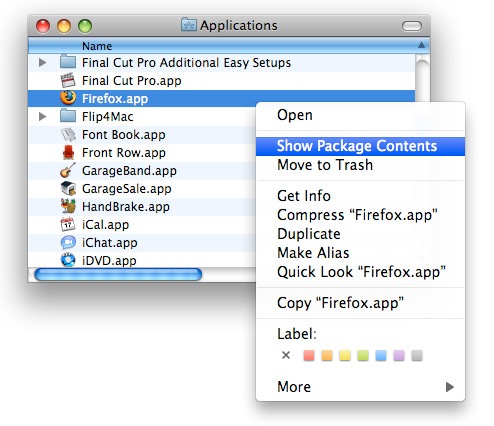
Once in there, you can open the folders Contents > MacOS > res.
You can find the viewsource.css file in here, and can edit it with any garden variety text editor. There is a big license block at the top of the file. I didn’t see anything in the license which would prohibit altering this for your own purposes, but I’m not very good with all the legal stuff. I imagine that since Firefox is open source and all, and you aren’t repackaging it and distributing it in any way, editing this in not a problem.
Before changing anything, I’d also recommend backing up a spare copy. Most just because you might do something wacky, get annoyed with it over time, and want to switch back to the default.
Here is how I messed with mine. Basically just made a special dark/cloudy background image for it and played with the colors:
*|*:root {
  background: url(viewsource-bg.jpg) top center no-repeat black;
}
#viewsource {
  font-family: -moz-fixed;
  font-weight: normal;
  color: white;
  white-space: pre;
}
#viewsource.wrap {
  white-space: pre-wrap;
}
pre {
  font: inherit;
  color: inherit;
  white-space: inherit;
  margin: 0;
}
.start-tag {
 color: #ff5353;
 font-weight: bold;
}
.end-tag {
 color: #ff5353;
 font-weight: bold;
}
.comment {
 color: #86d98f;
 font-style: italic;
}
.cdata {
 color: #CC0066;
}
.doctype {
 color: steelblue;
 font-style: italic;
}
.pi {
 color: orchid;
 font-style: italic;
}
.entity {
 color:#FF4500;
 font-weight: normal;
}
.text {
  font-weight: normal;
}
.attribute-name {
 color: white;
 font-weight: bold;
}
.attribute-value {
 color: lightblue;
 font-weight: normal;
}
.summary {
 display: block;
 background-color: #FFFFCC;
 width: 90%;
 border: solid;
 border-width: 1pt;
 font-family: sans-serif;
}
.popup {
  font-weight: normal;
}
.markupdeclaration {
 color: steelblue;
 font-style: italic;
}
.error, .error > .start-tag, .error > .end-tag,
.error > .comment, .error > .cdata, .error > .doctype,
.error > .pi, .error > .entity, .error > .attribute-name,
.error > .attribute-value {
  color: red;
  font-weight: bold;
}
That got me this:

Wouw!
Great trick!
Thank you very much!!!
Ha! That’s pretty slick. Thanks for the tweek.
Haha you’re crazy/bored
Nice one Chris :D
Cool Trick! Thanks!
That’s cool stuff. I hope Chrome doesn’t overtake Firefox
How did you get the background image to show? I’ve tried everything but nothing works. I’ve even tried using your code with an image I created.
@Justin: Not sure, just make sure image is in the same directory as CSS file, that the image is saved correctly and displaying properly (drag it onto a browser window to check). And make sure you set it to display at the “top”. A lot of code windows are super tall, so if you set it to center it might be way down the page.
great trick!
for windowns, the file to this trick is:
C:\Program Files\Mozilla Firefox\res\viewsource.css
Good find, I’ll probably setup up my view to a black background now. :)
Cool stuff! Us designer types love being different.
Nice trick, thanks ;)
Where is the link to viewsource-bg.jpg ?
What I’d really like to know is how to get it to display using 4 spaces per tab instead of 8. Any thoughts?
Has anyone tried this on a windows machine? I edited viewsource.css under Program Files\Mozilla Firefox\res but my changes didn’t take effect.
Good trick. It is quite valuable when you are used to a certain style. Thanks
Thats a good trick although nobody else will see it.
Now if I can just get it to colour code my Javascript comments.
// In green would look great!